As a reminder
The entitlement to additional leave for severe disability is adjusted in line with the actual number of working days per week.
So, for a standard five-day week, the entitlement to additional leave for people with severe disabilities is five working days per calendar year.
Step One:
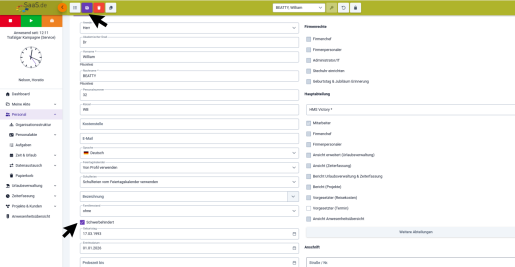
Record an employee’s severe disability
.png?height=267&width=516 "Additional leave 1(1)")
Select the "Personnel" module in the dashboard.
Click on the pencil icon to select the relevant person
Now tick the box labelled "Severe disability" with a click of the mouse.
Don’t forget to save!
Please note!
This tick is for information purposes only and is not automatically taken into account by the system when recording holiday entitlement.
Step Two:
Create additional leave
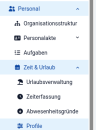
In your dashboard, select the "Personnel" module
with a click of the mouse.
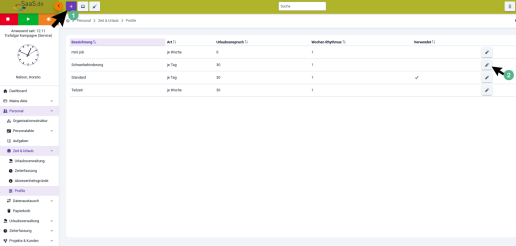
Then go to the sub-section "Time & Leave" and select "Profiles"
You can now create a new profile or edit an existing one.
- To create a new profile, click on"+" and edit the new profile
or - Edit an existing profile by clicking on the pencil icon
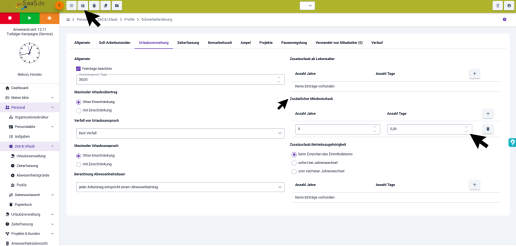
In your profile, click on ‘HolidayManagement’.
On the right-hand side, you will find the sub-item ‘Additional minimum holiday’.
You can now set the number of additional holiday days under ‘Number of Days ’.
The point in time from which the entitlement to additional leave begins is set under ‘Number of Years’.
Don’t forget to save!