The Personio API v1 will be automatically deactivated on 1 September.
Would you like to continue using an interface with Personio? No problem!
Switch to the Personio v2 API now and make using SaaS.de even more convenient. You’ll also save yourself unnecessary administrative effort.
A comparison of the benefits of the new interface:
| V1 (old) | Personio module (new) |
|---|---|
| Trigger manually, by year/month |
Automatic nightly synchronisation – set it up and forget it |
|
Create only; duplicates or conflicts occur on subsequent transfers |
True mirror: changes and deletions are reflected; can be repeated as often as required |
|
No cover arrangements |
Substitutes are transferred (v2 feature) |
|
Half-days without ‘half-day’ designation |
Morning/afternoon correct – including the new half-day feature in SaaS.de itself |
|
Times: send once, never correct |
Time corrections end up in Personio |
|
Errors vanish into thin air |
Connection status + transfer report with history, email optional – nothing fails silently. Errors are immediately noticeable! |
|
Interruptions may occur in large companies |
Scales to 500+ employees (rate-limit-aware) |
Always stay on top of things with SaaS.de
.png?height=281&width=516 "CleanShot 17 July 2026 at 16:32:01(1)")
A clear overview of the connection status is displayed in the "Connection Status" card. The date and time of the last connection check and whether it was successful are shown.
Automatic transfer of working hours and absences to and from Personio can be enabled and disabled in the "Automation" tab.
In the "Transfer times manually" and "Transfer absences manually" tabs, the transfer can also be initiated manually on a monthly basis
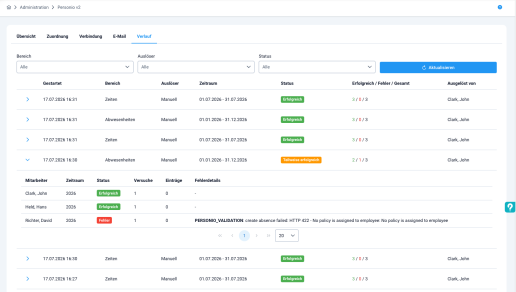
And the final tab, "Last Runs", lists when transfers were carried out. The list displays the date and time, the category (times, absences) and the status (Successful). The final column shows the number of employees for whom the transfer was successful.
Trends are clearly visible