The new SaaS.de app
Quick and easy
Clock in and out with a single tap, with your project right there
Always at a glance
Always keep an eye on your time balance and overtime
Flexible
Request holiday wherever you are
Offline
Works even without an internet connection; synchronises automatically
Download now for free:
Start with a project. Straight away when you clock in
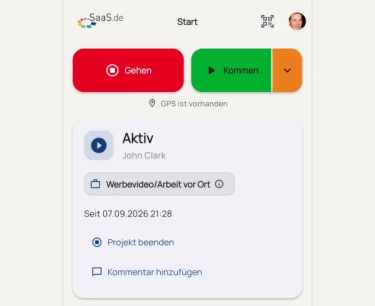
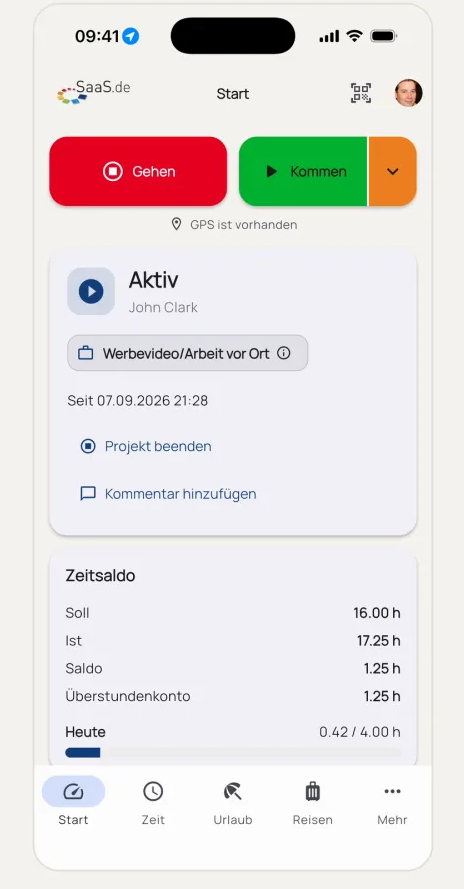
Tap ‘ Start’ to begin your working day. Use the orange arrow next to it to select the relevant project straight away. On the home screen, you can see at any time what you’re currently working on and how long you’ve been working on it. You can finish the project or add a comment with another tap.
Time balance and overtime. Always up to date.
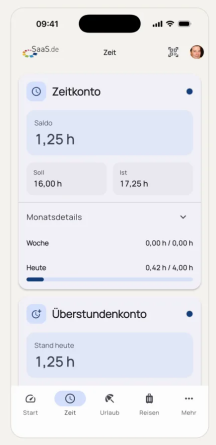
In the ‘Time’ section, you can keep track of your working hours. The time account shows your current balance as well as target and actual hours. Below that, you’ll see the week and day, including a progress bar for today. The overtime account shows your current balance, updated daily. This means you always know where you stand, without having to do the maths or ask anyone.
Holiday Entitlement. Everything at a glance.
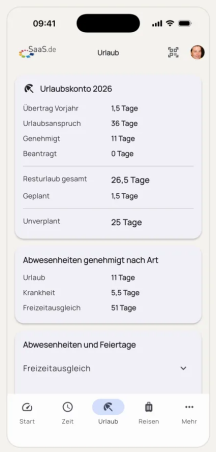
The holiday entitlement shows at a glance how many days’ holiday you are entitled to:
- Carry-over from the previous year,
- holiday entitlement,
- days already approved and requested.
This gives you your remaining holiday entitlement, as well as days that are planned and those yet to be planned.
Below this, you can see your approved absences by type, such as holiday, sick leave or time off in lieu. Public holidays and other absences are also shown.
Request holiday leave. In seconds.
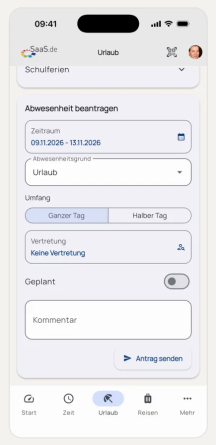
You can submit a holiday request directly in the app, wherever you are. Select the dates and the reason for your absence, and specify whether it’s a full or half day. If necessary, enter a replacement, mark the request as planned and add a comment. Tap ‘Send request’ and your request is on its way.
Offline? No problem. Your bookings remain saved.
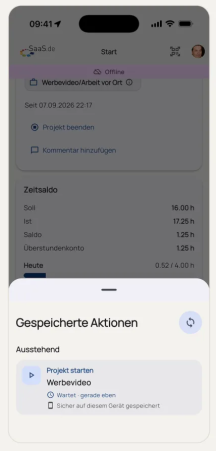
No network coverage on site, in the basement or whilst out and about? The app will then show that you’re offline, and you can still continue clocking in and out. Your entries are securely stored on your device and listed as pending under ‘Saved Actions’. As soon as you’re connected again, they’ll be automatically synchronised, and nothing will be lost.